

A quick project to visualise some of the open data available about the UK train network.
First of all, the result, you should be able to see a map of the UK below, with coloured dots appearing to represent trains as they arrive at stations in realtime.
This requires a browser that supports SVG and websockets, I’ve only tested it works in Firefox and Chrome.
Click for larger version
So, whats going on here?
It starts with the network rail operational data feeds one of which provides a stream of events for train movements (excellently documented by the Open Rail Data wiki). The interesting fields of data are the timestamp of the event, and the planned timestamp of the event, as well as the STANOX code. These allow me to locate the event, and to calculate the delay between when the event should have happened, and when it actually happened.
To display the events on a map the STANOX code needs to be translated into something more useful, to do that I grabbed one of the reference data files described here. I then use that to convert STANOX codes to TIPLOC codes (bear with me). Once I have the TIPLOC code I can find the Easting and Northing of stations using the NaPTAN dataset. This doesn’t cover the locations of all events as it only has public stations and doesn’t include depot/switch points that trains also report at, but it turns out it locates about 70% of the events received, which is more than enough for a visualisation.
Unfortunately Eastings and Northings are not a very useful co-ordinate system, what I really want is WGS84 latitude and longitude (GPS co-ordinates), thankfully Chris Veness of movable-type.co.uk has written conversion functions in javascript.
At this point I’m connecting to the National Rail data feed in node, looking up the location and coverting to the useful lat/long, so I have a realtime stream of train locations and how delayed they are in my console. The next step is to get this into a browser.
I don’t really have any experience with drawing maps in the browser, but my first guess that d3 will be useful proves correct, and I quickly find this extremely useful tutorial: Let’s Make a Map. I take the end result of this tutorial, slightly zoom and recentre the map (the national rail data doesn’t cover Northern Ireland, and not much goes on in the very north of Scotland). The result is a nice looking SVG UK map that I can draw points on using the d3 projection to convert the lat/long to x/y points.
The last thing to link together is to get the data from node to the browser, I wanted to use websockets given the streaming nature of the data, so I grab ws for node. I currently use lighttpd as a webserver, which can’t handle websocket proxying, so I also setup HAProxy in front of lighttpd to pass the websocket requests directly to node.
At this point it all works, I have dots appearing on my map in the browser as trains arrive at stations. To make things a little more interesting I use d3 to create a colour gradient for on time to very delayed trains, and I use a radial gradient with some transparency to make trains slightly colour an area of the map.
The result is what you (hopefully) see above, an animated map that shows locations of trains as they arrive, colour coded by how delayed the train is. The source for this is all available on GitHub.
 PassHash is a Chrome extension, Android app and website which allows you to generate strong, unique passwords using a master password and key based on the site you wish to use the password on.
Having secure passwords for every site you visit is difficult, in reality many people (including me) use the same password for more than one place. This is bad as it increases the potential problem if your password is compromised, for example, if you share your email account’s password with another website, who then (accidentally or intentionally) give away your password, your email is no longer secure. There are a number of methods of reducing these problems and PassHash uses a technique which generates new passwords based on one secure password which you never share directly with anyone. It is worth noting that PassHash is far from unique, and there are many similar tools, as well as alternatives like LastPass, however, none of the alternatives met my requirements, as I will describe below.
PassHash works by taking your master password (which should be a password which is complicated, long and only known by you), and combines it with a memorable key for each website you want to use it on (using the domain name is the default, i.e. amazon.com or ebay.co.uk). This combination is then transformed in a way that cannot be easily reversed (using SHA-1), and modified to start with a lower case letter, followed by a number, followed by an upper case letter, and finally 9 more characters which can be lowercase, uppercase, or numeric. You can then use this password for the website with the key you gave, and know that you will be able to generate it again in the future, but no one else will.
So, why is PassHash better than any of the available alternatives?
- PassHash has no settings (unlike most of the alternatives), this might seem to be a bad thing, but settings are something else to remember, and something that could be wrong by default. PassHash attempts to have sensible defaults, and generate passwords accepted on as many websites as possible. Passwords generated are 12 characters long, and always include at least one of each of lowercase, uppercase and numeric characters. Longer passwords may not be allowed on all websites, and are harder to type if you need to manually enter them. Symbols are often not allowed in passwords and are also hard to type, especially if being input on a phone or other mobile device.
- PassHash is accessible from anywhere, there is a Chrome extension for use on your own computer, as well as a website you can use anywhere. There is also an Android app which allows you to generate passwords without entering your master password on a computer you may not trust. As nothing is stored PassHash also works even when you have no internet connection.
- The PassHash algorithm is simple and the source code is available, there is no need to trust that it generates passwords in a sensible way, you can check for yourself. As well as this, if I were to withdraw the Chrome extension anyone could release software to generate the same passwords.
- PassHash doesn’t store any of your passwords – including your master password – anywhere, locally or remotely. Services such as LastPass are always at risk of attack and by using them you are trusting the LastPass developers have not made any mistakes which could result in your passwords not being properly encrypted.
- PassHash is completely free, and always will be, with no potential for me to change this, as the source code is publicly available and no part of PassHash is provided as a service.
- The PassHash chrome extension can automatically enter generated passwords into text boxes on websites, this avoids both showing the password on the screen and storing the password in the clipboard at any point.
While this all sounds great, PassHash does have a couple of downsides.
- All of your passwords being based on one master passwords requires you to keep that password completely secret, if you compromise that password, none of your passwords are safe. Unlike services such as LastPass if you compromise your master password you will need to change your password on every site you used PassHash to generate passwords for. This means you must be particularly careful when entering your master password on any computer or device you do not fully trust.
- Remembering passwords generated with PassHash is not really an option, which is not necessarily an issue as long as you have ways of accessing your passwords while not at your computer, which is why the website and Android app exist
Website: http://passhash.connorhd.co.uk/
Source code: GitHub
Kindlizer is an attempt to make the web browser on the Kindle 3 more useful. Currently it consists of a simple RSS feed reader built on some JavaScript which makes the Kindle browser behave more like a standard Kindle book.
Having recently acquired a Kindle e-book reader I immediately investigated less obvious ways of using it than just reading books. Amazon themselves offer magazines, newspapers and blogs as well as normal books, however blogs particularly seem like something I shouldn’t need to pay for (especially considering I don’t have the 3G Kindle so won’t be making use of the included Whispernet fee). Of course there are a number of 3rd party services for Kindle out there, calibre is an e-book manager that will also download many popular news/magazines and send them directly to your Kindle. There is also kindlefeeder.com which will send aggregated RSS feeds to your Kindle. Other more generic services such as Instapaper also have some form of Kindle support (Instapaper will send unread saved pages as a digest to your Kindle on a regular basis).
Kindlizer is slightly different to all of these services as it attempts to create an interface to be used directly on the Kindle, rather than sending static files to the Kindle to be read later. Amazon have announced a development kit for the Kindle called the KDK to allow development of applications which run on the Kindle, however it is currently in a closed beta and appears to be quite restrictive in terms of free data usage. This means Kindlizer is restricted to the experimental web browser built into the Kindle.
The Kindle web browser is Webkit based which means it has excellent support for web standards, unfortunately in order for the browser to display all kinds of websites it has a less intuitive interface. The directional pad on the Kindle controls a mouse pointer which jumps around in a grid on the screen and snaps to clickable elements (why spacial navigation wasn’t used I have no idea), as well as this the page back and forward keys on the Kindle become page up/page down in the browser, meaning on each press the page is only scrolled a small portion. On top of this many pages are far too large to fit on the Kindle screen and are first shown zoomed out, requiring the user to first select a region to zoom in on.
Kindlizer attempts to fix some of these problems with the use of some JavaScript to trick the browser into showing the content one page at a time, with the page turn buttons on the Kindle moving forward or backward entire pages at once. On top of this CSS styling makes the documents appear with the same formatting as Kindle books, and large areas around clickable elements allows for far easier movement of the mouse cursor. The JavaScript is written to allow for arbitrary blocks of HTML to be split into pages and displayed on the Kindle, currently this is used in conjunction with the Google Feed API to allow users to view RSS feeds on the Kindle. The results so far are shown in the screenshots below:
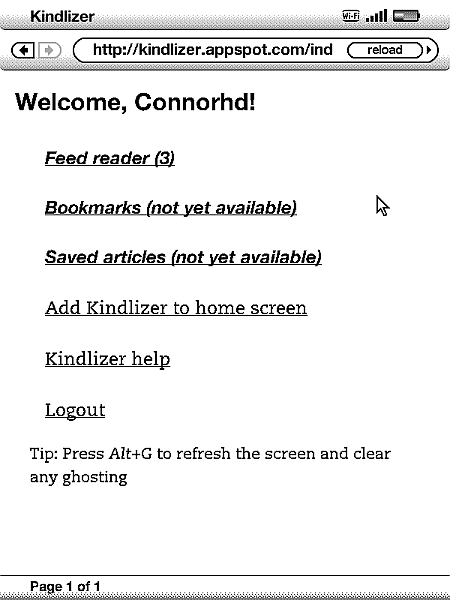
Kindlizer homepage as viewed on the Kindle
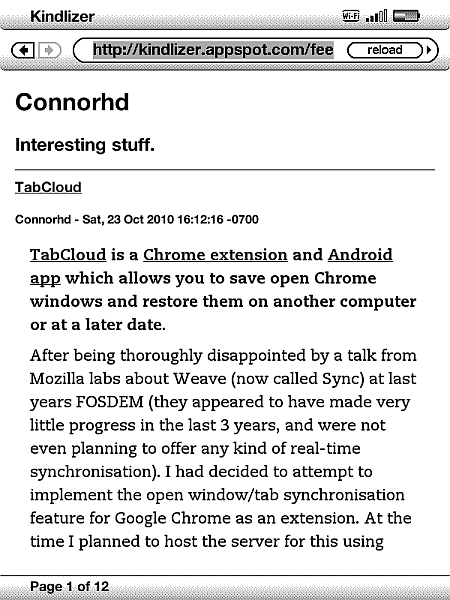
Viewing this blog's RSS feed on Kindlizer
You can visit the (as of writing unfinished) Kindlizer site on Google App Engine here, alternatively there is a demo which shows this blog’s RSS feed and does not require login here. Neither of which work particularly well on any device other than a Kindle (they may kind of work on your browser, but you won’t be able to change page). The full source code for the App Engine site is open source and available here.


